Portfolio
Nib - a Markdown editor with an AI terminal
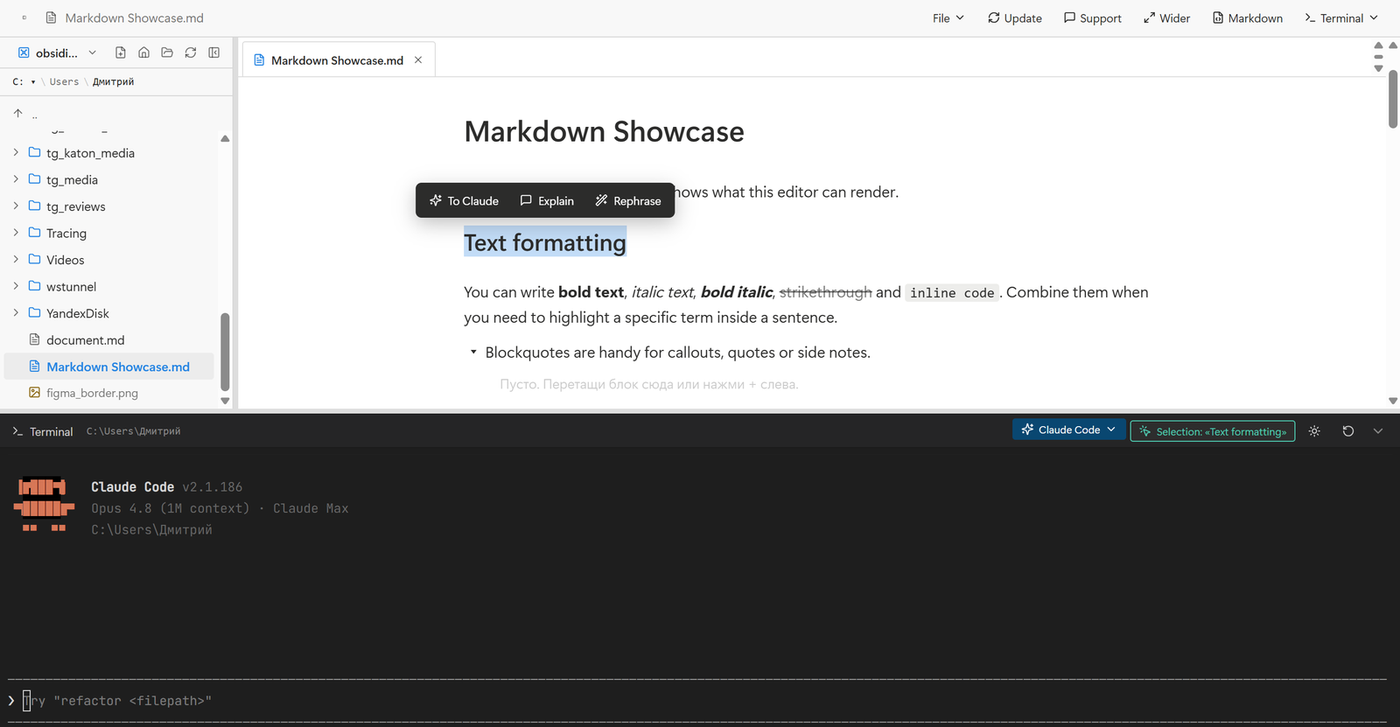
Nib is a Markdown editor for Windows with a terminal built right into the window. You write in tidy blocks while an AI agent runs alongside in the same window - you can edit a document and give commands about it without jumping between a chat tab and your files.
Select a line, press "To Claude" - and the agent in the terminal below already knows which piece you picked and which file it lives in. No copying back and forth.
What it does
- Block-based Markdown editor - headings, lists, checklists, quotes, callouts, collapsible blocks, tables and code. Everything is saved as plain .md files that open anywhere
- Terminal inside the app - PowerShell or cmd plus Claude Code, launched in the same folder you're editing. Ask it to rewrite, shorten, translate or restructure a whole file
- The AI sees your selection - highlight text and commands like "rephrase", "explain" or "make a table" work on exactly that piece, in place
- Selection menu - "To Claude", "Explain" and "Rephrase" buttons pop up over any selection for quick edits without typing commands
- Local and offline - files live in a regular folder on disk. No account, no sync; nothing leaves your computer until you send it to the AI yourself
How it works
The document and the terminal live in one window and work with the same folder. Text edits and agent commands flow without context switching: write, select, hand it to the AI, and see the result right there in the file.
The app checks for updates on its own - when a new version is out, an update button appears right inside. It ships as an .exe installer for Windows 10/11.